By default, AgentJail’s sandbox blocks known credential stores such as ~/.aws
and ~/.ssh, and strips its configured list of ambient credential variables.
That is an important boundary. It also means a shielded agent cannot authenticate
to AWS just because your terminal can.
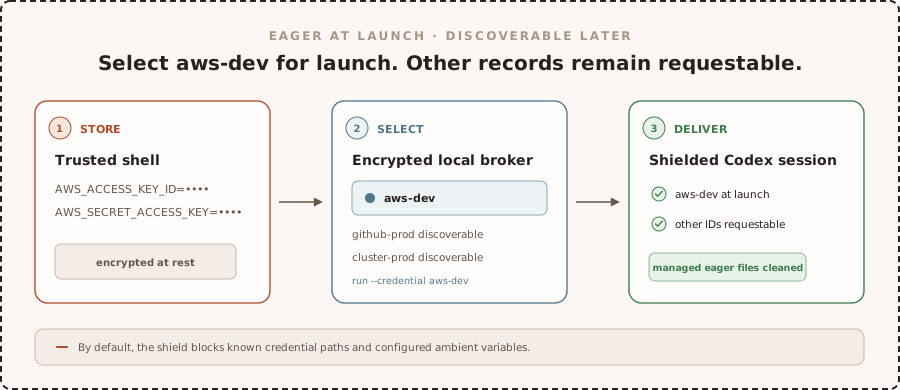
Until now, there was no general way to create a credential in AgentJail and deliver it to one selected agent session. v1.6.0 adds that path without opening the rest of your credential stores.
The idea is simple:
- Store a credential in AgentJail’s encrypted local broker.
- Give it a short ID, such as
aws-dev. - Select that ID when you start an agent session.
- AgentJail delivers that credential at launch and cleans up the private session files it manages when the session ends.
your AWS credentials
    -> encrypted AgentJail broker
    -> select "aws-dev"
    -> one shielded agent session
The ID is safe to show in a list or audit record. The value is not. Codex and Claude can see available IDs, labels, and tags without values. If they request an exact ID, however, the credential material is returned to the agent. In v1.6.0, those requests are auto-approved and audited.
A one-minute walkthrough
Suppose your terminal has temporary AWS credentials set and you want Codex to use that account.
First, store those variables as one credential named aws-dev:
agentjail credential set aws-dev \
  --from-env AWS_ACCESS_KEY_ID \
  --from-env AWS_SECRET_ACCESS_KEY \
  --from-env AWS_SESSION_TOKEN
AgentJail reads the values from your current environment and puts them in its encrypted local broker. The values do not appear in the command.
Check that the record exists:
agentjail credential listThe list shows aws-dev, not the access key or secret.
Now start Codex with that credential:
agentjail run --credential aws-dev -- codexInside that session, AWS tools receive AWS_ACCESS_KEY_ID,
AWS_SECRET_ACCESS_KEY, and AWS_SESSION_TOKEN at launch. Known credential
paths remain blocked, and AgentJail still strips the ambient variables configured
in your policy. When the session ends, it removes any managed private files it
created for eager delivery.
Codex and Claude can also discover and request another stored generic credential by exact ID. In v1.6.0, the broker auto-approves and audits those requests. The request returns the real values or file contents to the agent, so use narrowly scoped credentials.
That is the whole workflow: store, select, run.
TL;DR
- Store credentials under names you choose. A record can contain environment variables, private file bindings, or one value read from stdin.
- Deliver credentials at launch. Add
--credential IDto inject the selected environment variables and managed private files when the session starts. - Discover and request by exact ID. Codex and Claude can list IDs, labels, and tags without values. An exact request returns the real material and is auto-approved and audited in v1.6.0.
- Use the same workflow for any provider. Slack tokens, kubeconfigs, cloud credentials, and credentials for internal tools all use the same record format.
- Run approved host commands from Codex on macOS. The host proxy now supports macOS with the same allow-once contract already available on Linux.
Store a credential
Use agentjail credential set to create a record in AgentJail’s encrypted local
broker.
For AWS credentials already exported in your shell:
agentjail credential set aws-dev \
  --from-env AWS_ACCESS_KEY_ID \
  --from-env AWS_SECRET_ACCESS_KEY \
  --from-env AWS_SESSION_TOKEN \
  --label "Development AWS account" \
  --tag aws
--from-env captures the current value from your trusted shell and delivers it
under the same environment variable name. Repeat the flag when one credential
needs several variables. If you use a long-lived AWS access key rather than
temporary credentials, omit AWS_SESSION_TOKEN.
For a credential that lives in a file:
agentjail credential set cluster-dev \
  --from-file KUBECONFIG="$HOME/.kube/config" \
  --label "Development cluster" \
  --tag kubernetes
With eager --credential delivery, AgentJail creates a private mode-0600 copy
and sets KUBECONFIG to its session path. The agent does not receive access to
the original credential directory.
You can also pipe an existing value into a named environment variable:
printf '%s' "$INTERNAL_API_TOKEN" | \
  agentjail credential set internal-api --from-stdin INTERNAL_API_TOKEN
The CLI never accepts a credential value as an argument, so the value does not land in shell history or a process listing.
List and remove records with:
agentjail credential list
agentjail credential remove cluster-dev
Listing shows exact IDs, not values.
Choose what arrives at launch
Select a credential when you launch the agent:
agentjail run --credential aws-dev -- codexThe ID is an exact selection key. AgentJail does not infer a provider, account,
environment, or permission level from it. A name such as aws-dev describes
the record to you and the agent. The service on the other end still decides what
the credential can do.
You can deliver more than one record when the task needs them:
agentjail run \
  --credential aws-dev \
  --credential github-release-bot \
  -- codex
Eager delivery injects the selected environment values before the agent starts.
For file bindings, AgentJail creates files in its private mode-0700 session
directory with mode 0600, then removes that directory when the session ends.
Static values already present in a running process cannot be recalled, so use
provider-side IAM or RBAC to limit what each credential can do.
The launch selection is not an allowlist for the whole session. If the broker contains other generic credentials, Codex and Claude can discover their IDs and request them later.
Let the agent request a credential
You do not always know what a task will need before it starts. v1.6.0 gives shielded Codex and Claude sessions a credential surface with two operations:
- List the available IDs, labels, and tags.
- Request one exact ID.
The inventory contains no values. Labels and tags help the agent choose, but AgentJail never selects a credential implicitly. Every stored generic credential is discoverable in v1.6.0, and exact requests are auto-approved and audited.
An in-session request shares exact selection, authorization, and audit with eager delivery, but it presents the material differently:
exact ID
    -> authorize for this shielded session
    -> record the request
    -> return real environment values or file content to the agent
    -> agent applies the values or writes the file
The returned material can remain in the agent transcript or in files the agent creates. AgentJail cannot guarantee cleanup of those copies. Use in-session requests only with credentials scoped to the task.
What the credential boundary protects
AgentJail imports credential values from environment variables, files, or stdin. It keeps them out of argv, inventory results, and audit records. An exact in-session request intentionally returns the requested material to the agent, so that value may appear in its transcript.
It also rejects environment bindings that could replace the executable search path, dynamic loaders, proxy or TLS settings, shell startup, module paths, or SSH-agent state. Those variables can change how the sandbox itself behaves, so they are not valid credential outputs.
Static credentials delivered to a session are available to that session. They are not restricted to one executable inside it. By default, AgentJail blocks known credential paths and strips a configured environment-variable list, not every possible secret name or location. Add project-specific secret names and paths to policy when needed.
Also in v1.6.0
Host commands on macOS
Shielded Codex sessions on macOS can now request an eligible host command through the same native allow-once flow available on Linux:
agentjail proxy -- gh issue list --limit 10Codex shows its native approval prompt before the command runs. Approval is bound
to the session, executable, full argv, working directory, project root, sanitized
PATH, broker process, and fresh process ancestry. It can be used once.
The host proxy does not provide a general shell escape. Shells, interpreters, sensitive clients, AgentJail control commands, and generic runtime wrappers are not eligible. Approved commands get no stdin or TTY, have a 30-second limit, and can return at most 1 MiB across stdout and stderr.
Required tunnel mode
Tests and release gates can now require the transparent tunnel instead of accepting a fallback:
agentjail run --tunnel --require-tunnel -- codexSet AGENTJAIL_REQUIRE_TUNNEL=1 for the same behavior in automation. The macOS
release gate uses this mode with a real Codex session and requires executed
allow, deny, and bypass scenarios.
The release tarballs remain CLI-only. They contain agentjail and
agentjail-hook, but do not install or activate the separately built macOS
Network Extension required by the full transparent tunnel. The default provider
capture path still works without the extension.
Upgrade
Upgrade through the same channel you installed from:
brew upgrade agentjail
# or
agentjail update
Then create a credential and launch a session with it:
agentjail credential set aws-dev \
  --from-env AWS_ACCESS_KEY_ID \
  --from-env AWS_SECRET_ACCESS_KEY \
  --from-env AWS_SESSION_TOKEN

agentjail run --credential aws-dev -- codex
The selected credential arrives at launch. Codex and Claude can discover and request another stored generic credential later by exact ID.